×
Thumbnail

🚌🔥 Coach Master Bus Simulator 2026 🇧🇩 | ৩GB RAM মোবাইলে খেলুন 😍 | Version 0.9.19 Free Download

🔥 NEW UNITED MERCEDES-BENZ AC BUS MOD — OFFICIALLY RELEASED! 🚍🇧🇩 United Mercedes-Benz AC Bus Mod for BUSSID — A1 & A2 Version | Realistic Graphics, Seat View, HD Sound & Smooth Drive [AD_PLACEMENT] United Mercedes-Benz AC Bus Mod — New Release Bus simulator fans in Bangladesh have another exciting bus mod to try. The United Mercedes-Benz AC Bus Mod has been released with an attractive golden/yellow livery, realistic exterior design, detailed interior, A1 and A2 versions, seat-view features, and a focus on smooth driving performance. This mod is designed for players who enjoy realistic Bangladeshi bus simulation and want to experience a premium AC coach inside Bus Simulator Indonesia (BUSSID). The bus shown in the release design features the United Mercedes branding with a Mercedes-Benz-inspired coach body, large front windshield, modern headlights, detailed grille, passenger windows, exterior mirrors, wheels, and a premium-looking yellow/golden paint scheme. The overall appearance is suitable for players who want to add a stylish intercity coach to their BUSSID garage. The mod also highlights A1 and A2 versions, giving players additional options when selecting the bus they want to drive. Another major feature is the seat view, allowing players to experience the bus from inside the passenger cabin. The interior presentation includes individual passenger seats, curtains, overhead lighting, luggage/rack areas, and Mercedes-style branding. [AD_PLACEMENT] Whether you are creating Bangladesh bus simulator videos, making gameplay content for YouTube, collecting BUSSID mods, or simply looking for a new coach to drive, this United Mercedes-Benz AC Bus Mod can add a different style to your gameplay. Mod Highlights: A1 & A2 Version • Realistic Graphics • Seat View • HD Sound • Smooth Drive • Premium AC Coach Design • Bangladesh-Style Livery [AD_PLACEMENT] 🚍 United Mercedes-Benz A1 & A2 Bus Mod One of the main highlights of this release is the availability of A1 and A2 versions. Having multiple versions makes the mod more interesting because players can choose the version that best matches their preferred gameplay style. The A1 and A2 naming also makes it easier for players to identify the available versions when downloading and installing the mod. If you are a BUSSID player who regularly experiments with different coaches, having multiple variants can make your collection more useful. The exterior design is centered around the United Mercedes identity. The large UNITED MERCEDES lettering is visible across the side of the bus, while the golden body gives the vehicle a premium appearance. The Mercedes-inspired front grille and emblem further enhance the visual style. The body contains multiple passenger windows, allowing the interior to remain visible from the outside. The large windshield provides a broad view of the road while driving from the driver's perspective. [AD_PLACEMENT] The front section includes detailed headlights, lower lights, grille sections, windshield wipers, mirrors, and other exterior elements. These details are particularly important for BUSSID players who enjoy taking screenshots or recording cinematic gameplay. ⭐ Realistic Graphics and Exterior Design The realistic graphics are another major attraction of the United Mercedes-Benz AC Bus Mod. The exterior has been designed to provide a modern coach appearance while keeping the recognizable United Mercedes visual identity. The golden/yellow color combination creates a strong visual presence on the road. The side panels contain branding and decorative elements, while the windows use a dark finish that gives the coach a premium AC-bus appearance. The front of the bus is especially detailed. Players can see the large windshield, modern headlight arrangement, Mercedes-style grille, bumper, side mirrors, and lower lighting elements. These features can make the bus look impressive during both normal gameplay and screenshots. For content creators, realistic exterior details can also be useful when creating YouTube thumbnails, gameplay videos, Facebook posts, or promotional screenshots. [AD_PLACEMENT] The bus can look particularly attractive on maps featuring highways, city roads, rural roads, terminals, bridges, and long-distance routes. A golden coach moving through a detailed Bangladesh-style environment can create a strong visual combination for gameplay videos. 🚌 Premium AC Coach Appearance The United Mercedes-Benz mod is designed as an AC coach, which means the overall design focuses on a comfortable long-distance passenger bus appearance. The large windows and curtains shown in the interior provide the cabin with a premium passenger-coach feeling. The seating arrangement is designed to resemble a modern intercity bus rather than a basic city bus. For players who enjoy long-distance driving in BUSSID, this type of coach can be particularly interesting. You can create your own route, choose a destination, pick up passengers, and drive across different parts of your favorite BUSSID map. [AD_PLACEMENT] The exterior branding also helps distinguish the bus from standard coaches. The United Mercedes name is clearly displayed on the side and front areas, making the vehicle recognizable during gameplay. 🪑 Detailed Interior and Seat View One of the highlighted features of this release is the Seat View. The seat-view feature gives players the opportunity to experience the bus from different passenger positions. Instead of only driving from the cockpit, you can explore the passenger cabin and view the interior from a seat. The interior shown in the release image features: Premium passenger seats Yellow/golden seat design Curtains beside the windows Overhead lighting Spacious passenger cabin Detailed ceiling Mercedes-style branding Modern coach interior appearance [AD_PLACEMENT] This feature can be especially useful for players who make cinematic BUSSID videos. You can switch between driving views and passenger-seat views to create more dynamic gameplay. For example, you could record the beginning of a trip from the driver's cockpit, switch to a passenger seat while traveling on a highway, and then return to the driver view when approaching a terminal. This can make your gameplay video feel more like a complete bus journey rather than a simple driving session. 🔊 HD Sound and Smooth Drive The release artwork also highlights HD Sound & Smooth Drive. Sound is an important part of any bus simulator mod. A detailed vehicle model can look excellent, but engine and driving sounds can make the gameplay experience much more immersive. With the United Mercedes-Benz AC Bus Mod, the sound-focused design aims to provide a more enjoyable driving experience. Players can combine the bus sound with the environmental audio available in BUSSID to create a realistic journey. [AD_PLACEMENT] A smooth-driving experience is also useful for long routes. When driving for extended periods, players generally want predictable steering, acceleration, braking, and camera movement. The exact driving behavior can depend on the version of the mod and the player's BUSSID setup, so performance and handling may vary depending on the device, game version, map, and configuration. 🇧🇩 Perfect for Bangladesh Bus Simulator Gameplay The United Mercedes-Benz bus has a visual style that fits well with Bangladesh bus simulator content. Bangladesh has a large community of bus-simulation players who enjoy customized bus skins, realistic coaches, local liveries, highway routes, terminals, and Bangladesh-inspired environments. This mod can therefore be used for different types of gameplay, including: Bangladesh bus driving Long-distance coach journeys Dhaka-to-district style routes Highway driving Terminal gameplay Night driving Rainy-road gameplay Multiplayer-style content YouTube bus simulator videos BUSSID screenshot creation [AD_PLACEMENT] You can also combine the bus with different Bangladesh maps, traffic mods, environment packs, and other compatible BUSSID modifications to create a customized simulation experience. 🎮 How to Use the United Mercedes Bus Mod in BUSSID After downloading the appropriate mod file, players normally need to place the bus mod in the correct BUSSID mod directory and then activate it from the game's mod section. The general process is: Step 1 — Download the Mod Download the United Mercedes-Benz AC Bus Mod from the provided download section. [AD_PLACEMENT] Step 2 — Locate the Downloaded File After downloading, open your Android file manager and locate the downloaded BUSSID mod file. Depending on the release format, the file may be provided in a supported BUSSID mod format. Step 3 — Move the Mod File Move or copy the mod file into the appropriate BUSSID Mods folder. The exact folder location can vary depending on the BUSSID version and Android device configuration. [AD_PLACEMENT] Step 4 — Open BUSSID Launch Bus Simulator Indonesia after placing the mod file in the appropriate location. Open the vehicle/mod selection area and check whether the United Mercedes-Benz bus appears. Step 5 — Select the Bus Select the United Mercedes-Benz coach and choose the available A1 or A2 version if both versions are included with the download. Step 6 — Start Driving Select your preferred map, route, weather, traffic, and driving settings, then start your journey. [AD_PLACEMENT] 📱 Performance on Android Devices Performance can vary depending on your smartphone hardware and the complexity of the BUSSID environment. A detailed bus mod may use more 3D models, textures, materials, lights, and interior objects than a basic vehicle. Players using low-end or older Android devices may therefore need to adjust their graphics settings. If your device experiences lag, try reducing graphics quality, lowering visual effects, reducing traffic where possible, and closing background applications. [AD_PLACEMENT] Players with more powerful devices can experiment with higher graphics settings for improved visual quality. The mod's actual performance also depends on the map, traffic density, number of active objects, weather effects, and other installed modifications. 🌧️ Use the Bus for Different Gameplay Scenarios The United Mercedes-Benz AC Bus Mod can be used for many different BUSSID scenarios. Highway Driving Take the bus onto a long highway route and experience the coach at cruising speed. Highway gameplay is particularly suitable for the large windshield and passenger-coach design. [AD_PLACEMENT] City Driving Use the bus inside a busy city environment and navigate traffic, intersections, terminals, and narrow roads. Night Driving The detailed front lighting can make the bus interesting for nighttime gameplay. Combine it with a night environment and realistic traffic for a different experience. [AD_PLACEMENT] Rainy Weather Try the bus during rainy conditions and create cinematic gameplay featuring wet roads, reflections, traffic, and windshield views. Passenger Seat Gameplay Use the seat-view feature to record passenger-perspective footage. This can be useful for relaxing bus journey videos. [AD_PLACEMENT] 📸 Great for BUSSID Screenshots and Thumbnails The United Mercedes-Benz bus also works well for BUSSID screenshots and YouTube thumbnails. Its golden body provides strong visual contrast against roads, trees, buildings, and other environmental elements. You can position the bus at a terminal, highway, bridge, fuel station, or roadside location and capture screenshots. Content creators can use different camera angles, including: Front view Side view Rear view Driver cockpit Passenger seat Low-angle exterior view Highway cinematic view Terminal view [AD_PLACEMENT] For thumbnail creation, try to keep the bus clearly visible and use a high-resolution screenshot. A clean background and strong vehicle angle can make the final thumbnail easier for viewers to understand. 🛠️ United Mercedes Mod Features Here is a quick overview of the features highlighted for this release: Feature Details Bus Type Mercedes-Benz AC Coach Branding United Mercedes Versions A1 & A2 Graphics Realistic-style exterior Interior Detailed passenger cabin Seat View Included/highlighted Sound HD Sound Driving Smooth Drive Design Golden/Yellow Premium Livery Game Bus Simulator Indonesia [AD_PLACEMENT] The exact features included can depend on the particular mod package, so always check the included files and release information before installation. 🔥 Why BUSSID Players May Want to Try This Mod The biggest attraction of this release is the combination of a premium-looking coach body, United Mercedes branding, A1/A2 variants, interior details, seat-view presentation, and HD sound. Instead of using the same standard vehicle repeatedly, players can add this coach to their collection and create new gameplay scenarios. [AD_PLACEMENT] The bus can also be combined with different skins and environments when compatible. This gives players more flexibility when producing custom gameplay. If you operate a BUSSID mod website, YouTube channel, Facebook page, or gaming community, this type of release can also be useful for creating fresh content around a new bus. 🚍 United Mercedes-Benz Bus Mod for Long Routes Long-distance routes are one of the most natural ways to enjoy an AC coach. Choose a long route, configure your preferred weather and traffic settings, and start the journey. During the trip, you can use different camera perspectives to enjoy both the exterior and interior. [AD_PLACEMENT] The passenger cabin makes the coach suitable for journey-style videos. You can record a complete trip from departure to arrival and include different views throughout the video. For example: Terminal → City Road → Highway → Rural Road → Destination Terminal This type of route can create a complete virtual bus journey for BUSSID viewers. [AD_PLACEMENT] 📥 Download United Mercedes-Benz AC Bus Mod If you are looking for the United Mercedes-Benz AC Bus Mod for BUSSID, this release is presented as a free-download mod featuring A1 and A2 versions, realistic graphics, seat view, HD sound, and smooth driving. Before installing any mod, make sure your game is compatible with the mod version and keep a backup of important files. [AD_PLACEMENT] If the mod comes with multiple files, read the included instructions and identify which file corresponds to the A1 and A2 versions. Do not rename or modify files unnecessarily if the mod requires a specific filename or structure. ⚠️ Important Installation Notes Keep the following points in mind before installing: Make sure you have enough storage space. Download the complete mod package. Use a trusted download source. Keep your existing BUSSID mods backed up. Check compatibility with your BUSSID version. Install only the required files. Restart BUSSID if the mod does not immediately appear. If the game crashes, temporarily remove the new mod and test again. Avoid installing too many high-detail mods simultaneously on low-end devices. Check whether the A1 and A2 files are separate versions. [AD_PLACEMENT] 🎥 Create YouTube Videos With the United Mercedes Mod This bus is also suitable for YouTube content creators. Some video ideas include: United Mercedes-Benz Bus Mod Gameplay New United Mercedes A1 Bus Driving United Mercedes A2 BUSSID Gameplay Bangladesh Highway Bus Driving Realistic AC Bus Journey United Mercedes Seat View Gameplay HD Sound Bus Simulator Gameplay Bangladesh Bus Mod Showcase New BUSSID Bus Mod Review United Mercedes Night Driving [AD_PLACEMENT] For better search visibility, include the main keyword naturally in the YouTube title, description, tags, and video content. Avoid stuffing the same keyword repeatedly because readable descriptions are generally more useful for visitors. 🇧🇩 Final Words The United Mercedes-Benz AC Bus Mod brings a premium golden coach design to BUSSID gameplay with the highlighted A1 and A2 versions, realistic graphics, detailed interior, seat-view experience, HD sound, and smooth-drive focus. [AD_PLACEMENT] For Bangladesh bus simulator fans, this can be an interesting addition to a BUSSID mod collection. The United Mercedes branding and golden livery give the coach a distinctive appearance, while the interior seat view adds another perspective for players who enjoy passenger-style gameplay. [AD_PLACEMENT] Whether you want to drive on highways, explore city routes, create cinematic screenshots, record YouTube videos, or simply try a new AC coach, the United Mercedes-Benz mod offers several ways to customize your BUSSID experience. [AD_PLACEMENT] Download the mod, install it correctly, select your preferred A1 or A2 version, choose a route, and start your next virtual bus journey. 🚍🔥 [AD_PLACEMENT] If you enjoy BUSSID mods, Bangladesh bus skins, Mercedes bus mods, AC coach mods, and realistic bus simulator gameplay, keep checking back for more new releases and updates. [AD_PLACEMENT]
Thumbnail

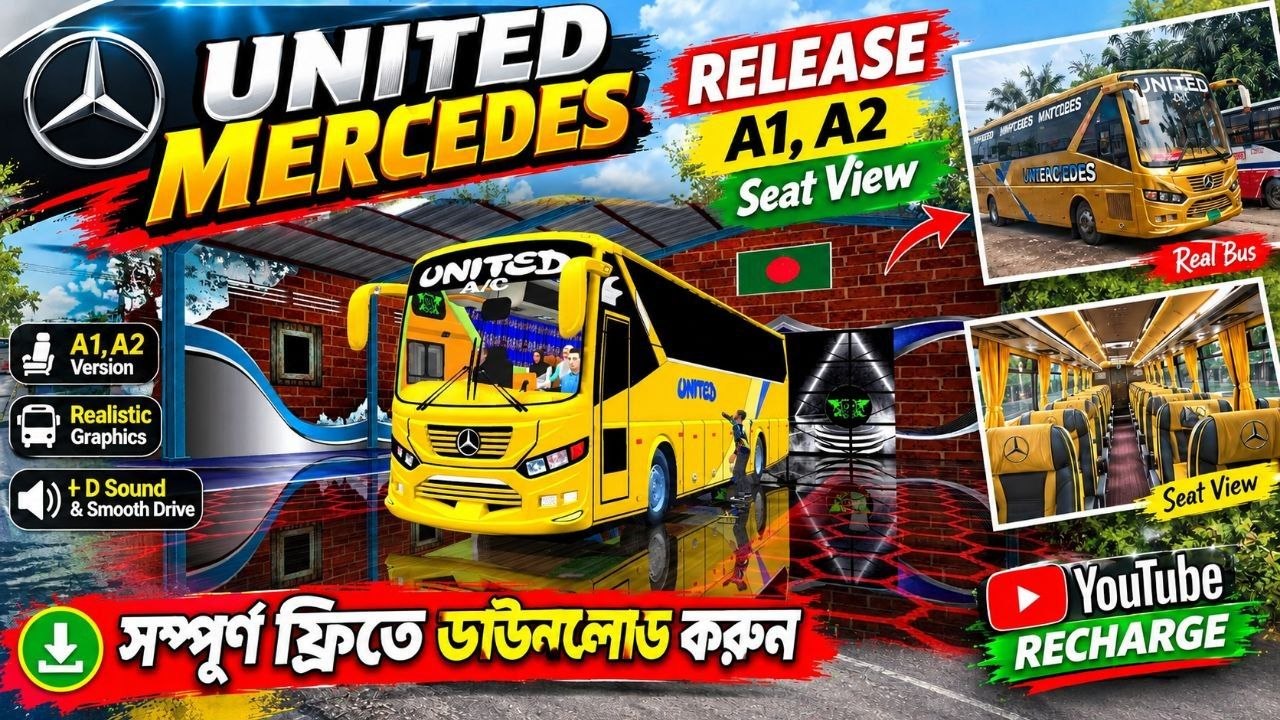
NEW UNITED MERCEDES-BENZ AC BUS MOD — OFFICIALLY RELEASED! 🚍🇧🇩

🔥 NEW UNITED MERCEDES-BENZ AC BUS MOD — OFFICIALLY RELEASED! 🚍🇧🇩 United Mercedes-Benz AC Bus Mod for BUSSID — A1 & A2 Version | Realistic Graphics, Seat View, HD Sound & Smooth Drive [AD_PLACEMENT] United Mercedes-Benz AC Bus Mod — New Release Bus simulator fans in Bangladesh have another exciting bus mod to try. The United Mercedes-Benz AC Bus Mod has been released with an attractive golden/yellow livery, realistic exterior design, detailed interior, A1 and A2 versions, seat-view features, and a focus on smooth driving performance. This mod is designed for players who enjoy realistic Bangladeshi bus simulation and want to experience a premium AC coach inside Bus Simulator Indonesia (BUSSID). The bus shown in the release design features the United Mercedes branding with a Mercedes-Benz-inspired coach body, large front windshield, modern headlights, detailed grille, passenger windows, exterior mirrors, wheels, and a premium-looking yellow/golden paint scheme. The overall appearance is suitable for players who want to add a stylish intercity coach to their BUSSID garage. The mod also highlights A1 and A2 versions, giving players additional options when selecting the bus they want to drive. Another major feature is the seat view, allowing players to experience the bus from inside the passenger cabin. The interior presentation includes individual passenger seats, curtains, overhead lighting, luggage/rack areas, and Mercedes-style branding. [AD_PLACEMENT] Whether you are creating Bangladesh bus simulator videos, making gameplay content for YouTube, collecting BUSSID mods, or simply looking for a new coach to drive, this United Mercedes-Benz AC Bus Mod can add a different style to your gameplay. Mod Highlights: A1 & A2 Version • Realistic Graphics • Seat View • HD Sound • Smooth Drive • Premium AC Coach Design • Bangladesh-Style Livery [AD_PLACEMENT] 🚍 United Mercedes-Benz A1 & A2 Bus Mod One of the main highlights of this release is the availability of A1 and A2 versions. Having multiple versions makes the mod more interesting because players can choose the version that best matches their preferred gameplay style. The A1 and A2 naming also makes it easier for players to identify the available versions when downloading and installing the mod. If you are a BUSSID player who regularly experiments with different coaches, having multiple variants can make your collection more useful. The exterior design is centered around the United Mercedes identity. The large UNITED MERCEDES lettering is visible across the side of the bus, while the golden body gives the vehicle a premium appearance. The Mercedes-inspired front grille and emblem further enhance the visual style. The body contains multiple passenger windows, allowing the interior to remain visible from the outside. The large windshield provides a broad view of the road while driving from the driver's perspective. [AD_PLACEMENT] The front section includes detailed headlights, lower lights, grille sections, windshield wipers, mirrors, and other exterior elements. These details are particularly important for BUSSID players who enjoy taking screenshots or recording cinematic gameplay. ⭐ Realistic Graphics and Exterior Design The realistic graphics are another major attraction of the United Mercedes-Benz AC Bus Mod. The exterior has been designed to provide a modern coach appearance while keeping the recognizable United Mercedes visual identity. The golden/yellow color combination creates a strong visual presence on the road. The side panels contain branding and decorative elements, while the windows use a dark finish that gives the coach a premium AC-bus appearance. The front of the bus is especially detailed. Players can see the large windshield, modern headlight arrangement, Mercedes-style grille, bumper, side mirrors, and lower lighting elements. These features can make the bus look impressive during both normal gameplay and screenshots. For content creators, realistic exterior details can also be useful when creating YouTube thumbnails, gameplay videos, Facebook posts, or promotional screenshots. [AD_PLACEMENT] The bus can look particularly attractive on maps featuring highways, city roads, rural roads, terminals, bridges, and long-distance routes. A golden coach moving through a detailed Bangladesh-style environment can create a strong visual combination for gameplay videos. 🚌 Premium AC Coach Appearance The United Mercedes-Benz mod is designed as an AC coach, which means the overall design focuses on a comfortable long-distance passenger bus appearance. The large windows and curtains shown in the interior provide the cabin with a premium passenger-coach feeling. The seating arrangement is designed to resemble a modern intercity bus rather than a basic city bus. For players who enjoy long-distance driving in BUSSID, this type of coach can be particularly interesting. You can create your own route, choose a destination, pick up passengers, and drive across different parts of your favorite BUSSID map. [AD_PLACEMENT] The exterior branding also helps distinguish the bus from standard coaches. The United Mercedes name is clearly displayed on the side and front areas, making the vehicle recognizable during gameplay. 🪑 Detailed Interior and Seat View One of the highlighted features of this release is the Seat View. The seat-view feature gives players the opportunity to experience the bus from different passenger positions. Instead of only driving from the cockpit, you can explore the passenger cabin and view the interior from a seat. The interior shown in the release image features: Premium passenger seats Yellow/golden seat design Curtains beside the windows Overhead lighting Spacious passenger cabin Detailed ceiling Mercedes-style branding Modern coach interior appearance [AD_PLACEMENT] This feature can be especially useful for players who make cinematic BUSSID videos. You can switch between driving views and passenger-seat views to create more dynamic gameplay. For example, you could record the beginning of a trip from the driver's cockpit, switch to a passenger seat while traveling on a highway, and then return to the driver view when approaching a terminal. This can make your gameplay video feel more like a complete bus journey rather than a simple driving session. 🔊 HD Sound and Smooth Drive The release artwork also highlights HD Sound & Smooth Drive. Sound is an important part of any bus simulator mod. A detailed vehicle model can look excellent, but engine and driving sounds can make the gameplay experience much more immersive. With the United Mercedes-Benz AC Bus Mod, the sound-focused design aims to provide a more enjoyable driving experience. Players can combine the bus sound with the environmental audio available in BUSSID to create a realistic journey. [AD_PLACEMENT] A smooth-driving experience is also useful for long routes. When driving for extended periods, players generally want predictable steering, acceleration, braking, and camera movement. The exact driving behavior can depend on the version of the mod and the player's BUSSID setup, so performance and handling may vary depending on the device, game version, map, and configuration. 🇧🇩 Perfect for Bangladesh Bus Simulator Gameplay The United Mercedes-Benz bus has a visual style that fits well with Bangladesh bus simulator content. Bangladesh has a large community of bus-simulation players who enjoy customized bus skins, realistic coaches, local liveries, highway routes, terminals, and Bangladesh-inspired environments. This mod can therefore be used for different types of gameplay, including: Bangladesh bus driving Long-distance coach journeys Dhaka-to-district style routes Highway driving Terminal gameplay Night driving Rainy-road gameplay Multiplayer-style content YouTube bus simulator videos BUSSID screenshot creation [AD_PLACEMENT] You can also combine the bus with different Bangladesh maps, traffic mods, environment packs, and other compatible BUSSID modifications to create a customized simulation experience. 🎮 How to Use the United Mercedes Bus Mod in BUSSID After downloading the appropriate mod file, players normally need to place the bus mod in the correct BUSSID mod directory and then activate it from the game's mod section. The general process is: Step 1 — Download the Mod Download the United Mercedes-Benz AC Bus Mod from the provided download section. [AD_PLACEMENT] Step 2 — Locate the Downloaded File After downloading, open your Android file manager and locate the downloaded BUSSID mod file. Depending on the release format, the file may be provided in a supported BUSSID mod format. Step 3 — Move the Mod File Move or copy the mod file into the appropriate BUSSID Mods folder. The exact folder location can vary depending on the BUSSID version and Android device configuration. [AD_PLACEMENT] Step 4 — Open BUSSID Launch Bus Simulator Indonesia after placing the mod file in the appropriate location. Open the vehicle/mod selection area and check whether the United Mercedes-Benz bus appears. Step 5 — Select the Bus Select the United Mercedes-Benz coach and choose the available A1 or A2 version if both versions are included with the download. Step 6 — Start Driving Select your preferred map, route, weather, traffic, and driving settings, then start your journey. [AD_PLACEMENT] 📱 Performance on Android Devices Performance can vary depending on your smartphone hardware and the complexity of the BUSSID environment. A detailed bus mod may use more 3D models, textures, materials, lights, and interior objects than a basic vehicle. Players using low-end or older Android devices may therefore need to adjust their graphics settings. If your device experiences lag, try reducing graphics quality, lowering visual effects, reducing traffic where possible, and closing background applications. [AD_PLACEMENT] Players with more powerful devices can experiment with higher graphics settings for improved visual quality. The mod's actual performance also depends on the map, traffic density, number of active objects, weather effects, and other installed modifications. 🌧️ Use the Bus for Different Gameplay Scenarios The United Mercedes-Benz AC Bus Mod can be used for many different BUSSID scenarios. Highway Driving Take the bus onto a long highway route and experience the coach at cruising speed. Highway gameplay is particularly suitable for the large windshield and passenger-coach design. [AD_PLACEMENT] City Driving Use the bus inside a busy city environment and navigate traffic, intersections, terminals, and narrow roads. Night Driving The detailed front lighting can make the bus interesting for nighttime gameplay. Combine it with a night environment and realistic traffic for a different experience. [AD_PLACEMENT] Rainy Weather Try the bus during rainy conditions and create cinematic gameplay featuring wet roads, reflections, traffic, and windshield views. Passenger Seat Gameplay Use the seat-view feature to record passenger-perspective footage. This can be useful for relaxing bus journey videos. [AD_PLACEMENT] 📸 Great for BUSSID Screenshots and Thumbnails The United Mercedes-Benz bus also works well for BUSSID screenshots and YouTube thumbnails. Its golden body provides strong visual contrast against roads, trees, buildings, and other environmental elements. You can position the bus at a terminal, highway, bridge, fuel station, or roadside location and capture screenshots. Content creators can use different camera angles, including: Front view Side view Rear view Driver cockpit Passenger seat Low-angle exterior view Highway cinematic view Terminal view [AD_PLACEMENT] For thumbnail creation, try to keep the bus clearly visible and use a high-resolution screenshot. A clean background and strong vehicle angle can make the final thumbnail easier for viewers to understand. 🛠️ United Mercedes Mod Features Here is a quick overview of the features highlighted for this release: Feature Details Bus Type Mercedes-Benz AC Coach Branding United Mercedes Versions A1 & A2 Graphics Realistic-style exterior Interior Detailed passenger cabin Seat View Included/highlighted Sound HD Sound Driving Smooth Drive Design Golden/Yellow Premium Livery Game Bus Simulator Indonesia [AD_PLACEMENT] The exact features included can depend on the particular mod package, so always check the included files and release information before installation. 🔥 Why BUSSID Players May Want to Try This Mod The biggest attraction of this release is the combination of a premium-looking coach body, United Mercedes branding, A1/A2 variants, interior details, seat-view presentation, and HD sound. Instead of using the same standard vehicle repeatedly, players can add this coach to their collection and create new gameplay scenarios. [AD_PLACEMENT] The bus can also be combined with different skins and environments when compatible. This gives players more flexibility when producing custom gameplay. If you operate a BUSSID mod website, YouTube channel, Facebook page, or gaming community, this type of release can also be useful for creating fresh content around a new bus. 🚍 United Mercedes-Benz Bus Mod for Long Routes Long-distance routes are one of the most natural ways to enjoy an AC coach. Choose a long route, configure your preferred weather and traffic settings, and start the journey. During the trip, you can use different camera perspectives to enjoy both the exterior and interior. [AD_PLACEMENT] The passenger cabin makes the coach suitable for journey-style videos. You can record a complete trip from departure to arrival and include different views throughout the video. For example: Terminal → City Road → Highway → Rural Road → Destination Terminal This type of route can create a complete virtual bus journey for BUSSID viewers. [AD_PLACEMENT] 📥 Download United Mercedes-Benz AC Bus Mod If you are looking for the United Mercedes-Benz AC Bus Mod for BUSSID, this release is presented as a free-download mod featuring A1 and A2 versions, realistic graphics, seat view, HD sound, and smooth driving. Before installing any mod, make sure your game is compatible with the mod version and keep a backup of important files. [AD_PLACEMENT] If the mod comes with multiple files, read the included instructions and identify which file corresponds to the A1 and A2 versions. Do not rename or modify files unnecessarily if the mod requires a specific filename or structure. ⚠️ Important Installation Notes Keep the following points in mind before installing: Make sure you have enough storage space. Download the complete mod package. Use a trusted download source. Keep your existing BUSSID mods backed up. Check compatibility with your BUSSID version. Install only the required files. Restart BUSSID if the mod does not immediately appear. If the game crashes, temporarily remove the new mod and test again. Avoid installing too many high-detail mods simultaneously on low-end devices. Check whether the A1 and A2 files are separate versions. [AD_PLACEMENT] 🎥 Create YouTube Videos With the United Mercedes Mod This bus is also suitable for YouTube content creators. Some video ideas include: United Mercedes-Benz Bus Mod Gameplay New United Mercedes A1 Bus Driving United Mercedes A2 BUSSID Gameplay Bangladesh Highway Bus Driving Realistic AC Bus Journey United Mercedes Seat View Gameplay HD Sound Bus Simulator Gameplay Bangladesh Bus Mod Showcase New BUSSID Bus Mod Review United Mercedes Night Driving [AD_PLACEMENT] For better search visibility, include the main keyword naturally in the YouTube title, description, tags, and video content. Avoid stuffing the same keyword repeatedly because readable descriptions are generally more useful for visitors. 🇧🇩 Final Words The United Mercedes-Benz AC Bus Mod brings a premium golden coach design to BUSSID gameplay with the highlighted A1 and A2 versions, realistic graphics, detailed interior, seat-view experience, HD sound, and smooth-drive focus. [AD_PLACEMENT] For Bangladesh bus simulator fans, this can be an interesting addition to a BUSSID mod collection. The United Mercedes branding and golden livery give the coach a distinctive appearance, while the interior seat view adds another perspective for players who enjoy passenger-style gameplay. [AD_PLACEMENT] Whether you want to drive on highways, explore city routes, create cinematic screenshots, record YouTube videos, or simply try a new AC coach, the United Mercedes-Benz mod offers several ways to customize your BUSSID experience. [AD_PLACEMENT] Download the mod, install it correctly, select your preferred A1 or A2 version, choose a route, and start your next virtual bus journey. 🚍🔥 [AD_PLACEMENT] If you enjoy BUSSID mods, Bangladesh bus skins, Mercedes bus mods, AC coach mods, and realistic bus simulator gameplay, keep checking back for more new releases and updates. [AD_PLACEMENT]
Thumbnail

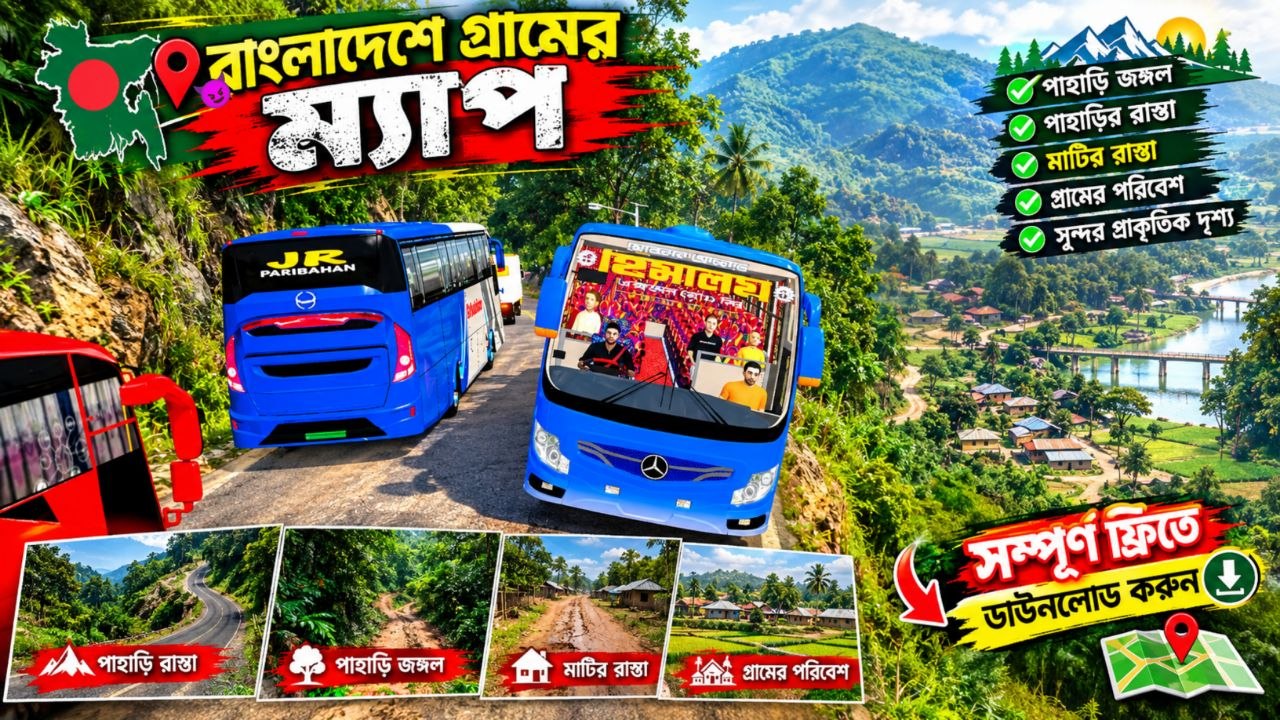
Bangladeshi Village Map Mod for BUSSID: Rural Roads, Village Scenery & Gameplay Guide

Bangladeshi Village Map Mod for BUSSID: Rural Roads, Village Scenery & Gameplay Guide If you enjoy Bus Simulator Indonesia (BUSSID) and want a more familiar South Asian atmosphere, a Bangladeshi village map mod can completely change the feel of your gameplay. Instead of driving through the standard Indonesian environments, a Bangladesh-inspired village map can bring rural roads, ponds, green fields, local markets, bridges, narrow village routes, and countryside scenery into your bus-driving experience. For players who enjoy Bangladesh bus gameplay, long-distance coach routes, or realistic rural driving, this type of map can also be a useful way to create more varied journeys. A village route feels different from a busy city map: roads may be narrower, scenery can be more open, and small details such as roadside shops, trees, waterways, and village homes can make a trip feel much more immersive. This guide explains what to look for in a Bangladeshi village map mod, how these maps can improve BUSSID gameplay, installation considerations, compatibility, troubleshooting, and tips for getting a better experience. [AD_PLACEMENT] What Is a Bangladeshi Village Map Mod? A Bangladeshi village map mod is a custom map designed to give a driving game a Bangladesh-inspired rural environment. In the BUSSID community, map modifications can be used to create alternative roads and locations that differ from the game's original environments. A Bangladesh village-style map may attempt to recreate elements commonly associated with rural Bangladesh, such as: Narrow village roads Green agricultural fields Ponds and canals Rural houses Small roadside shops Local markets Bridges and culverts Trees and vegetation Open countryside Village intersections Rural bus stops Long straight roads Unpaved or partially paved paths The exact features depend on the particular map file. Since community-created mods can vary significantly, you should always check the information provided by the original creator before claiming that a specific location, road, or feature is included. A good village map is not simply about changing the road texture. The surrounding environment is important because it creates the feeling of traveling through a rural area. [AD_PLACEMENT] Why Play a Bangladesh Village Map in BUSSID? One of the biggest attractions of a Bangladesh-inspired map is atmosphere. BUSSID already provides a driving-focused experience, but custom maps allow players to experiment with different environments. A rural Bangladesh-style route can make a familiar bus mod feel completely different. For example, imagine starting a journey early in the morning. Your bus leaves a small village market, crosses a narrow bridge, passes fields and ponds, and eventually reaches a larger road leading toward a town. That kind of route can make even a simple bus journey feel like a longer trip. 1. Rural Bangladesh Atmosphere The most obvious benefit is the countryside setting. Bangladesh has extensive rural areas with agricultural land, waterways, trees, homes, markets, and connecting roads. A map inspired by this environment can provide a distinctive setting for bus gameplay. 2. More Variety If you normally play on city or highway maps, a village map gives you another type of route. Instead of focusing entirely on traffic and large roads, you can enjoy: Slower driving Narrow roads Rural scenery Small bridges Village intersections Countryside exploration This variety can help keep gameplay interesting. 3. Bangladesh Bus Mod Compatibility A village map can pair naturally with Bangladesh-themed bus mods and liveries. Depending on the game's mod system and the individual files, players may combine a map with a suitable coach, local bus, or Bangladesh-inspired livery. However, compatibility should never be assumed. Always check whether the particular map and vehicle mods are designed to work together. [AD_PLACEMENT] Main Features to Look For Not every Bangladeshi village map mod will contain the same features. Before installing a map, check its description carefully. Here are some of the most useful features to look for. Village Roads Road design is one of the most important parts of a rural map. A convincing village route should ideally have roads that feel appropriate for the environment rather than simply placing city-style highways between rural objects. Narrow roads, turns, intersections, and changing road widths can make driving more interesting. Green Fields Agricultural scenery can immediately make a map feel more rural. Depending on the map design, fields may appear beside the road with trees, houses, water bodies, or small paths connecting different areas. Ponds and Waterways Water is an important part of many Bangladesh-inspired environments. A map may include ponds, canals, rivers, or other water features. These can provide visual variety and create opportunities for bridges and roadside scenery. Village Houses Small houses and residential structures can make a countryside road feel inhabited. The quality of these details depends heavily on the map creator and available game assets. Rural Markets A village market can be an excellent location for stopping or passing through. Markets can add: Shops Pedestrians or decorative objects Signs Small roads Parking areas Bus stopping points If a map includes these details, they can make the route feel more alive. [AD_PLACEMENT] Bangladesh Village Map Gameplay Experience The gameplay experience depends on the map's road design, object placement, performance optimization, and compatibility with the game. A well-designed rural route can encourage slower and more careful driving. Narrow Roads Require More Control On a narrow village road, maintaining the correct position becomes more important. Large buses may require additional care when approaching: Sharp turns Bridges Oncoming traffic Market areas Narrow intersections Residential areas This can create a different challenge compared with driving on a wide highway. Bridges Can Add Variety Small bridges are particularly useful in rural maps because they break up long stretches of road. A bridge over a pond or canal can also become a memorable part of a route. When driving a large coach across a narrow bridge, reduce your speed and maintain a safe line. Scenery Makes Long Routes More Enjoyable Long-distance gameplay can sometimes become repetitive if the scenery remains unchanged. A village map can reduce that feeling by introducing different environments throughout a route: Village → fields → bridge → market → residential area → open countryside → town road A varied route gives players more visual landmarks to recognize. [AD_PLACEMENT] How to Install a Bangladeshi Village Map Mod Installation steps can differ depending on the version of BUSSID, the map format, and how the creator packaged the mod. Therefore, do not assume that every map uses exactly the same installation process. A typical workflow may look like this: Step 1: Get the Map From a Trusted Source Use a reputable source or the original creator's published file whenever possible. Avoid suspicious download pages that require unnecessary applications, passwords, or permissions. Do not install an APK simply because a website claims it is required for a map file. Step 2: Check the File Format Before installation, identify the file type. The creator should ideally explain: File format Compatible BUSSID version Installation location Required additional files Whether the map replaces an existing map Any known limitations If those details are missing, verify the information before proceeding. Step 3: Back Up Your Existing Files Before modifying game files, create a backup of important content. This is particularly useful if you already have several maps, buses, liveries, or other modifications installed. A backup can make it easier to restore your previous setup if something goes wrong. Step 4: Install According to the Creator's Instructions Follow the instructions supplied with the specific map. Do not rename files randomly or move them into folders unless the installation guide tells you to do so. Step 5: Open BUSSID and Test the Map After installation, start the game and check whether the map appears correctly. Take a short test drive before beginning a long journey. Look for: Missing textures Invisible objects Road gaps Crashes Excessive lag Missing scenery Incorrect loading [AD_PLACEMENT] Compatibility and Requirements Compatibility is one of the most important things to check before downloading any game modification. A map may work correctly on one version of BUSSID but behave differently after a game update. Before installing, look for information about: Game Version Check whether the creator specifically lists a supported BUSSID version. If the mod was released a long time ago, compatibility with a newer game version may not be guaranteed. Device Performance Large maps can contain many environmental objects, textures, buildings, trees, vehicles, and other assets. On lower-end Android devices, this can potentially affect performance. Possible symptoms include: Frame-rate drops Stuttering Long loading times Crashes Increased battery consumption Storage Space Maps and associated files require storage space. Keep sufficient free storage available and avoid filling your device completely. RAM More detailed environments can place additional demands on system memory. If your device struggles with large maps, reducing graphics settings may help, depending on the game's available options. [AD_PLACEMENT] How to Improve Performance If your Bangladeshi village map runs slowly, try a few basic troubleshooting steps. Lower Graphics Settings If BUSSID provides graphics options on your version, experiment with lower settings. A small reduction in visual quality may provide smoother gameplay. Close Background Apps Before playing, close unnecessary applications running in the background. This can free system resources on devices with limited memory. Avoid Installing Too Many Mods at Once A large collection of maps and vehicle modifications can make troubleshooting more difficult. If you experience a problem, temporarily remove recently installed modifications and test the game again. Restart the Game Some issues can occur after installing or changing game files. A complete restart may help the game reload modified content. Keep a Backup If you frequently experiment with mods, maintaining backups is one of the simplest ways to avoid losing working configurations. [AD_PLACEMENT] Common Problems and Troubleshooting Map Does Not Appear If the map does not appear after installation, first verify that: The file was placed in the correct location. The file format is supported. The map is compatible with your game version. The installation process was completed correctly. The file is not corrupted. If the creator provides an installation guide, compare your steps with their instructions. Game Crashes When Loading the Map A crash can have several possible causes. The map may be incompatible with your current game version, the file may be damaged, or the device may not have enough available resources. Try removing the map and launching the game normally. If the game works without it, reinstall the map carefully or look for a compatible release. Missing Textures Missing textures can occur when a required asset is absent or incompatible. Check whether the creator mentions additional files or dependencies. Do not download random replacement files from unknown websites simply because they claim to fix the problem. Lag or Stuttering Performance problems may be related to the map's level of detail or your device. Try lowering graphics settings, closing background apps, and testing the map without other large modifications. Bus Gets Stuck Village roads can sometimes be narrow or contain unusual geometry. If your bus becomes stuck, reverse carefully or restart from a safe position if the game allows it. [AD_PLACEMENT] Tips for Realistic Bangladesh Village Gameplay A village map becomes more enjoyable when you adapt your driving style to the environment. Drive at a Moderate Speed Do not treat a narrow village road like a highway. Moderate speeds give you more time to react to corners, bridges, traffic, and roadside obstacles. Use a Suitable Bus A large coach can look impressive on a rural route, but a smaller bus may be easier to handle on narrow roads. Choose a vehicle that matches the route you want to simulate. Try Different Times or Weather If your version of BUSSID and the map support different weather or lighting conditions, experiment with them. A rural road can look very different during daylight, evening, or rainy conditions. Create Your Own Route Instead of simply driving from one end of the map to another, create a journey with several imaginary stops. For example: Village → Local Market → Bridge → Agricultural Area → Town → Main Road This gives your gameplay a more structured purpose. [AD_PLACEMENT] Bangladesh-Themed Bus and Livery Ideas A village map can also work well with a Bangladesh-inspired bus setup. You could create a complete theme around: Bangladesh bus liveries Local-style coach colors Interior customization Bus sound modifications Rural route names Destination boards Bangladesh-inspired signage If you're publishing your own mod, be careful when using copyrighted logos, commercial branding, photographs, or other creators' assets. Give appropriate credit when the asset license or original creator requires it. For website content, it is also useful to clearly separate your own original modifications from third-party files. [AD_PLACEMENT] Is a Bangladeshi Village Map Mod Worth Trying? The answer depends on what you want from BUSSID. Players who enjoy rural scenery and Bangladesh-inspired environments may appreciate the change from standard routes. A village map can also provide a useful setting for Bangladesh bus mods, coach liveries, and countryside driving videos. However, community maps can vary significantly in quality. Before installing one, consider: Does it support your BUSSID version? Is the download source trustworthy? Are installation instructions available? Does your device have enough performance? Does the map match your preferred gameplay style? Does the creator provide support or updates? These questions are more useful than judging a map solely from screenshots. [AD_PLACEMENT] Safety Tips When Downloading Game Mods Mod downloads should always be approached carefully. A map file does not normally justify installing an unrelated application or granting unusual permissions. Keep these practices in mind: Download From Trusted Sources Prefer the original creator, established mod communities, or reputable websites. Avoid Suspicious APKs If you are looking for a map file, be cautious if a website suddenly requires an unrelated APK. Scan Downloaded Files Use your device's security features and reputable security software where available. Read the Instructions A legitimate mod page should explain what the file is and how it should be used. Do Not Share Personal Information A game map should not require sensitive personal information. If a download page asks for unnecessary credentials, payment details, or other sensitive information, consider leaving the page. [AD_PLACEMENT] Natural Internal-Link Opportunities If you are publishing this article on a gaming or BUSSID website, consider adding internal links to related content. Useful anchor topics could include: Bangladesh Bus Mod BUSSID Bangladesh Livery BUSSID Map Mods How to Install BUSSID Mods BUSSID Coach Mods BUSSID Sound Mods Best Rural Bus Routes BUSSID Mod Troubleshooting Guide Only add links when you have corresponding articles on your website. Avoid creating links to pages that do not exist. [AD_PLACEMENT] Frequently Asked Questions What is a Bangladeshi village map mod? It is a custom game map designed around a Bangladesh-inspired rural environment. Depending on the creator, it may include village roads, fields, ponds, bridges, houses, markets, and other countryside scenery. Can I use a Bangladesh village map with a bus mod? Potentially, but compatibility depends on the particular map, bus mod, and BUSSID version. Check the creator's instructions before combining modifications. Will every Bangladesh village map work on the latest BUSSID version? No. Compatibility can vary between releases. Always check the version information supplied by the map creator. Can a village map cause lag? A detailed map may use significant graphics resources. Devices with limited performance may experience stuttering or longer loading times. What should I do if the map does not load? Check the installation location, file format, game version compatibility, and any required additional files. If the problem continues, remove the map and test the game without it. Is it safe to download any BUSSID map from the internet? You should not assume that every download is safe. Use trusted sources, avoid suspicious APK requirements, and do not provide unnecessary personal information. Can I use a Bangladesh livery with the map? If the game and the individual modifications support the combination, a Bangladesh-themed livery can complement the rural map. Check the specific mod instructions. Can I make my own Bangladesh village map? That depends on the tools and game-modification methods available for the game version you are using. Creating a custom map generally requires appropriate modding knowledge and compatible development tools. [AD_PLACEMENT] Final Thoughts A Bangladeshi village map mod can bring a fresh rural atmosphere to BUSSID gameplay. Village roads, green fields, ponds, bridges, houses, markets, and countryside scenery can create a route that feels very different from a conventional city or highway journey. The most important thing is to choose modifications carefully. Check compatibility information, follow the creator's installation instructions, keep backups of your existing files, and download only from sources you trust. For content creators, these maps can also provide interesting opportunities for Bangladesh-themed gameplay videos, screenshots, route guides, bus reviews, and mod showcases. Combining a suitable bus, livery, sound, and rural map can turn a simple drive into a much more distinctive gameplay experience. If you're building a BUSSID-focused website, this topic can also become part of a larger content cluster covering Bangladesh bus mods, village maps, coach liveries, sound mods, installation tutorials, and troubleshooting guides. That approach gives visitors useful information beyond a single download page while creating natural opportunities to connect related content. [AD_PLACEMENT]

Thumbnail

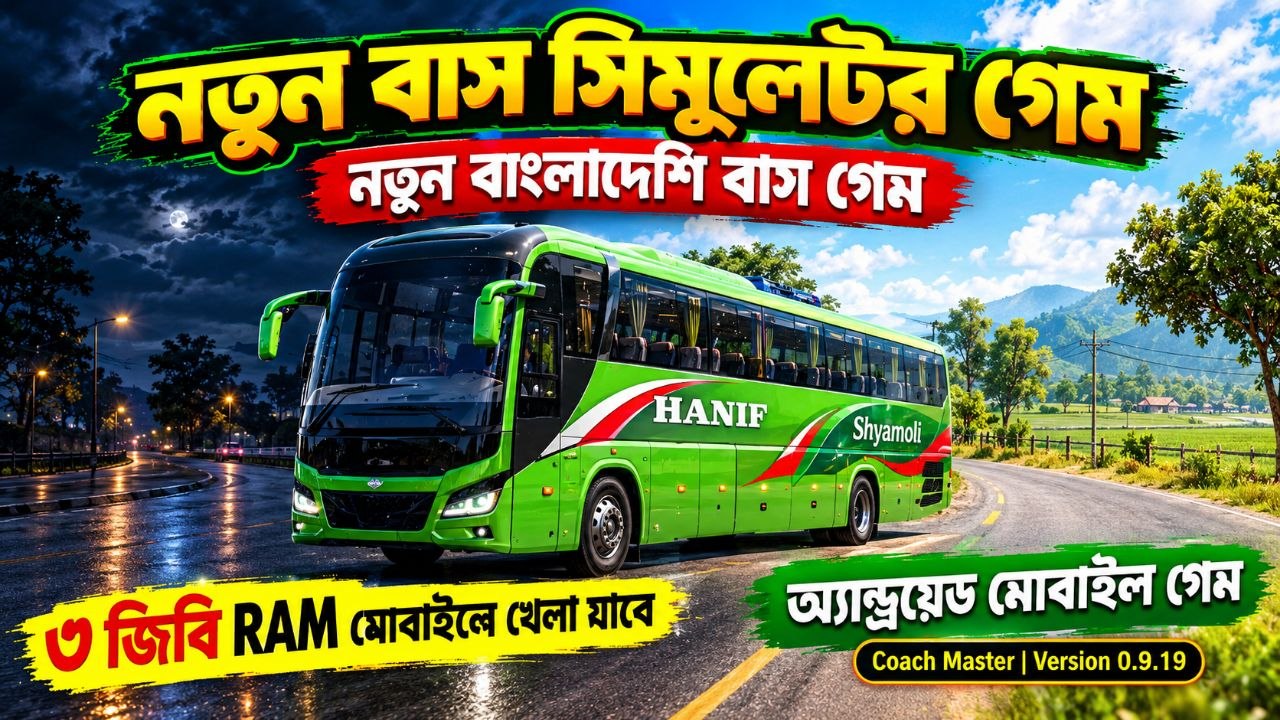
🚍 2GB/3GB RAM মোবাইলেও চলবে! বাংলাদেশি বাস গেম সেটআপ 2026 | Full Setup Tutorial 🇧🇩

আপনার মোবাইলের RAM যদি 2GB বা 3GB হয় এবং আপনি বাংলাদেশি বাস গেম খেলতে চান, তাহলে এই ভিডিওটি আপনার জন্য। এই Full Setup Tutorial 2026-এ আমরা দেখাব কীভাবে কম RAM-এর Android মোবাইলে একটি Bangladesh Bus Game সেটআপ করে খেলার জন্য প্রস্তুত করা যায়। অনেকেই মনে করেন বাস সিমুলেটর বা বাংলাদেশি বাস গেম খেলতে অবশ্যই 4GB, 6GB বা 8GB RAM-এর শক্তিশালী ফোন দরকার। কিন্তু সঠিক গেম, উপযুক্ত Graphics Settings এবং ভালোভাবে Setup করলে কিছু Low-End Android Device-এও বাস গেম খেলার সুযোগ থাকতে পারে। এই গাইডের মূল লক্ষ্য হলো নতুন এবং পুরোনো Android ব্যবহারকারীদের জন্য একটি সহজ Bangladesh Bus Game Setup Guide 2026 তৈরি করা। [AD_PLACEMENT] 🇧🇩 বাংলাদেশি বাস গেম 2026 বাংলাদেশি বাস গেম বর্তমানে Bangla gaming community-এর মধ্যে একটি জনপ্রিয় gaming category। বাস্তব বাংলাদেশের রাস্তা, বাস, ট্রাফিক, যাত্রী পরিবহন এবং বিভিন্ন ধরনের পরিবেশকে গেমের মধ্যে দেখতে অনেক খেলোয়াড়ই পছন্দ করেন। একটি ভালো Bangladesh Bus Simulator আপনাকে শুধু বাস চালানোর সুযোগ দেয় না; বরং একটি সম্পূর্ণ journey experience তৈরি করতে পারে। আপনি বিভিন্ন রাস্তা দিয়ে বাস চালাতে পারেন, বিভিন্ন পরিবেশ দেখতে পারেন এবং নিজের পছন্দ অনুযায়ী Graphics ও Controls পরিবর্তন করতে পারেন। এই ভিডিওটি বিশেষভাবে তাদের জন্য যারা 2GB RAM বা 3GB RAM Android ফোনে Bus Game চালানোর চেষ্টা করছেন। 📱 2GB RAM মোবাইলে বাস গেম 2GB RAM-এর ফোন বর্তমানে Low-End Android Device হিসেবে বিবেচিত হয়। এই ধরনের ফোনে বড় এবং Graphics-intensive game চালানোর সময় performance issue হতে পারে। তবে এর অর্থ এই নয় যে কোনো বাস গেমই চালানো সম্ভব নয়। [AD_PLACEMENT] Performance অনেক বিষয়ের ওপর নির্ভর করে: Processor GPU Available RAM Android Version Internal Storage Free Storage Game Optimization Graphics Settings Background Apps Device Temperature একই 2GB RAM থাকা দুইটি ফোনেও game performance একই নাও হতে পারে। তাই শুধু RAM দেখে কোনো game 100% guaranteed চলবে বলা ঠিক নয়। এই tutorial-এর উদ্দেশ্য হলো আপনার device অনুযায়ী game settings optimize করতে সাহায্য করা। [AD_PLACEMENT] 📲 3GB RAM মোবাইলে Bus Simulator 3GB RAM ফোন 2GB RAM-এর তুলনায় কিছুটা বেশি সুবিধা দিতে পারে। তবে এখানেও processor এবং GPU অত্যন্ত গুরুত্বপূর্ণ। যদি আপনার ফোনে 3GB RAM থাকে, তাহলে আপনি সাধারণত কিছুটা বেশি flexibility পেতে পারেন। কিন্তু High Graphics, high-resolution textures এবং অনেক বেশি background activity থাকলে performance কমে যেতে পারে। তাই 3GB RAM Bus Game Setup 2026 করার সময় Graphics quality এবং performance-এর মধ্যে balance রাখা গুরুত্বপূর্ণ। আপনার লক্ষ্য হওয়া উচিত: Stable Gameplay > Maximum Graphics অর্থাৎ Graphics একটু কম হলেও যদি game smooth থাকে, তাহলে সেটিই সাধারণত ভালো gaming experience। 🛠️ Full Setup Tutorial এই ভিডিওতে আমরা একটি সাধারণ setup workflow অনুসরণ করতে পারি। Step 1 — Device Check প্রথমে আপনার Android ফোনের: RAM Processor Android Version Free Storage GPU চেক করুন। Game install করার আগে storage অবশ্যই পর্যাপ্ত আছে কিনা নিশ্চিত করুন। Step 2 — Game File প্রস্তুত করা আপনি যে game ব্যবহার করছেন সেটির official/legitimate source থেকে প্রয়োজনীয় game files সংগ্রহ করুন। যদি game-এর OBB, data বা additional files প্রয়োজন হয়, তাহলে game creator-এর দেওয়া installation instructions অনুসরণ করুন। অজানা APK, modified installer বা সন্দেহজনক file ব্যবহার করা থেকে বিরত থাকুন। [AD_PLACEMENT] Step 3 — Installation Game-এর official installation method অনুসরণ করে APK বা game package install করুন। যদি Android security warning দেখায়, file-এর source যাচাই করুন। কোনো random website থেকে পাওয়া unknown executable বা suspicious application install করা নিরাপদ নয়। 🎮 Graphics Settings Low-End Android device-এর জন্য Graphics Settings অত্যন্ত গুরুত্বপূর্ণ। যদি game-এর মধ্যে Graphics options থাকে, তাহলে শুরুতে: Resolution — Low Graphics Quality — Low/Medium Shadows — Low/Off Reflections — Low/Off Anti-Aliasing — Off/Low Texture Quality — Low/Medium Traffic — Low View Distance — Low/Medium Effects — Low FPS — Stable option ব্যবহার করে দেখতে পারেন। তবে সব game-এর settings একই নয়। আপনার game-এ যে options রয়েছে সেগুলোর ওপর ভিত্তি করে পরিবর্তন করুন। [AD_PLACEMENT] 🚍 Bus Game-এর Controls Setup Bus simulator-এ ভালো Controls খুব গুরুত্বপূর্ণ। সাধারণত Android bus games-এ কয়েক ধরনের control option থাকতে পারে: Steering Wheel Screen-এর virtual steering wheel ব্যবহার করে বাস ঘোরানো যায়। Buttons Left এবং Right button ব্যবহার করে steering করা যায়। Tilt Control ফোন কাত করে steering করার ব্যবস্থা থাকলে সেটিও ব্যবহার করা যায়। আপনার ফোনে যেটি সবচেয়ে responsive মনে হয় সেটি ব্যবহার করুন। Low-End device-এ অনেক সময় simple controls ব্যবহার করলে gameplay experience আরও comfortable হতে পারে। 🛣️ Bangladesh Map Setup কিছু Bangladesh bus game-এ বিভিন্ন ধরনের map বা route থাকতে পারে। Map install করার আগে game creator-এর instructions অনুসরণ করা গুরুত্বপূর্ণ। যদি কোনো modded map ব্যবহার করেন, তাহলে game version-এর সঙ্গে সেটি compatible কিনা পরীক্ষা করুন। একটি পুরোনো map নতুন game version-এ কাজ নাও করতে পারে। তাই: Game Version + Map Version + Mod Version এই তিনটি compatibility-এর বিষয়টি মাথায় রাখুন। [AD_PLACEMENT] 🚌 Bangladesh Bus Mod Setup Bangladesh bus gaming community-তে বিভিন্ন ধরনের bus mod দেখা যায়। যেমন: Local Bus Intercity Bus Coach Bus AC Bus Highway Bus City Bus Luxury Coach তবে সব mod সব game বা সব version-এর সঙ্গে কাজ করবে না। Mod install করার আগে অবশ্যই creator-এর instructions পড়ুন। কোনো mod যদি অতিরিক্ত high-resolution texture ব্যবহার করে, তাহলে 2GB/3GB RAM device-এ performance সমস্যা হতে পারে। সেক্ষেত্রে optimized বা low-resolution version ব্যবহার করা ভালো হতে পারে—যদি creator বৈধভাবে সেটি প্রদান করে। ⚡ Low-End Phone Optimization 2GB/3GB RAM ফোনে game চালানোর আগে background applications বন্ধ করা যেতে পারে। [AD_PLACEMENT] উদাহরণ: Facebook Messenger Chrome TikTok YouTube Other games Unused apps যে apps প্রয়োজন নেই সেগুলো বন্ধ করলে available memory কিছুটা বাড়তে পারে। তবে Android নিজে memory management করে, তাই RAM সম্পূর্ণ খালি করার জন্য aggressive "RAM booster" ব্যবহার করা সবসময় প্রয়োজনীয় নয়। [AD_PLACEMENT] 🔥 Heating কমানোর কিছু সাধারণ টিপস দীর্ঘ সময় gaming করলে ফোন গরম হতে পারে। Gaming performance স্থিতিশীল রাখতে: সরাসরি রোদে খেলবেন না Charging অবস্থায় heavy gaming এড়িয়ে চলুন Background apps কম রাখুন অতিরিক্ত High Graphics ব্যবহার করবেন না ফোনের temperature বেশি হলে বিরতি নিন ফোন বেশি গরম হলে performance throttling হতে পারে এবং FPS কমে যেতে পারে। 📦 Storage Optimization অনেকেই শুধু RAM-এর দিকে তাকান, কিন্তু storage-ও গুরুত্বপূর্ণ। Game installation, cache, maps এবং mods-এর জন্য পর্যাপ্ত storage দরকার হতে পারে। আপনার ফোনে storage প্রায় সম্পূর্ণ ভরে গেলে performance এবং installation-related সমস্যা হতে পারে। তাই game install করার আগে কিছু free space রাখা ভালো। বিশেষ করে বড় bus game, map এবং mod ব্যবহার করলে storage requirement দ্রুত বাড়তে পারে। [AD_PLACEMENT] 🎯 2GB RAM vs 3GB RAM বিষয় 2GB RAM 3GB RAM Low Graphics Gaming ভালো হতে পারে আরও ভালো হতে পারে Multitasking সীমিত তুলনামূলক ভালো Heavy Maps সমস্যা হতে পারে কিছুটা সুবিধা High Graphics সাধারণত এড়ানো ভালো সাধারণত এড়ানো ভালো Background Apps কম রাখা ভালো কম রাখা ভালো Stable FPS Game optimization-এর ওপর নির্ভরশীল Game optimization-এর ওপর নির্ভরশীল মনে রাখবেন, RAM একমাত্র performance factor নয়। একটি ভালো processor/GPU থাকা 2GB RAM device কোনো দুর্বল hardware-এর 3GB RAM device-এর চেয়ে ভালো performance দিতে পারে। 🇧🇩 Bangla Gaming Experience বাংলাদেশি বাস গেমের অন্যতম আকর্ষণ হলো familiar environment। বাস্তব জীবনে দেখা রাস্তা, বাস এবং transportation culture-এর সঙ্গে মিল পাওয়া গেলে game experience আরও enjoyable হতে পারে। Bangla gaming creators-রা YouTube এবং অন্যান্য platform-এ Bangladesh Bus Simulator gameplay, bus mod, map এবং setup tutorial তৈরি করে থাকেন। এই ধরনের content নতুন players-দের game setup এবং controls বুঝতে সাহায্য করে। [AD_PLACEMENT] 🏁 Bus Game Setup 2026 2026 সালে Android bus game setup করার সময় শুধু graphics নয়, optimization-এর দিকেও গুরুত্ব দেওয়া উচিত। একটি সুন্দর-looking game সবসময় সবচেয়ে ভালো experience দেয় না। যদি High Graphics-এর কারণে: FPS drop হয় Stuttering হয় Game crash করে Phone অতিরিক্ত গরম হয় Loading time বেড়ে যায় তাহলে Graphics কমিয়ে stable performance নেওয়া বেশি ভালো। [AD_PLACEMENT] 🎮 Recommended Low-End Setup যদি আপনার device 2GB বা 3GB RAM-এর হয়, তাহলে শুরুতে একটি conservative configuration ব্যবহার করে দেখতে পারেন: Graphics: Low Texture: Low/Medium Shadow: Off/Low Reflection: Off/Low Traffic: Low Effects: Low View Distance: Low/Medium FPS: Stable/Low option তারপর gameplay smooth হলে একবারে একটি setting বাড়িয়ে পরীক্ষা করুন। এভাবে কোন setting performance-এর ওপর বেশি প্রভাব ফেলছে তা বুঝতে পারবেন। [AD_PLACEMENT] 🚨 গুরুত্বপূর্ণ সতর্কতা এই ধরনের game setup করার সময় নিরাপত্তার বিষয়টি ভুলবেন না। Unknown APK, cracked game, suspicious mod বা malware-containing file ব্যবহার করবেন না। Download করার আগে source যাচাই করুন। যদি কোনো website আপনার game install করার জন্য অপ্রয়োজনীয় application, browser extension বা suspicious executable install করতে বলে, তাহলে সেটি এড়িয়ে চলুন। Game বা mod creator যদি official installation instructions দেয়, সেটিই অনুসরণ করুন। 🌟 এই Tutorial কার জন্য? এই Bangladesh Bus Game Setup 2026 tutorial বিশেষভাবে উপযোগী হতে পারে: ✅ 2GB RAM Android users ✅ 3GB RAM Android users ✅ Low-End phone users ✅ Bangladesh Bus Game fans ✅ Bangla Gaming fans ✅ Bus Simulator players ✅ Bangladesh Bus Simulator players ✅ New Android gamers ✅ Bus Mod users ✅ Bangladesh map lovers ✅ Bus Driving Game fans আপনি যদি নতুন হয়ে থাকেন, তাহলে এই tutorial অনুসরণ করে ধাপে ধাপে নিজের device অনুযায়ী setup করার চেষ্টা করতে পারেন। [AD_PLACEMENT] 📢 Final Words 🚍 2GB/3GB RAM মোবাইলেও চলবে! বাংলাদেশি বাস গেম সেটআপ 2026 | Full Setup Tutorial 🇧🇩 হলো Low-End Android users-এর জন্য একটি practical setup guide। আপনার ফোন যদি 2GB বা 3GB RAM-এর হয়, তাহলে হতাশ হওয়ার আগে game-এর minimum requirements, processor/GPU capability এবং available storage পরীক্ষা করুন। সঠিক Graphics Settings, compatible game version, optimized map এবং appropriate controls ব্যবহার করলে কিছু low-end device-এ playable experience পাওয়া সম্ভব। তবে প্রত্যেক ফোনের hardware আলাদা হওয়ায় 2GB/3GB RAM মানেই নিশ্চিতভাবে সব বাস গেম চলবে—এমন নয়। Game optimization এবং device hardware-এর ওপর actual performance নির্ভর করবে। আপনি যদি Bangladesh Bus Game, Bangla Bus Simulator, Android Bus Game, 2GB RAM Bus Game, 3GB RAM Bus Game, Bus Game 2026 অথবা Bangladesh Bus Simulator Setup খুঁজে থাকেন, তাহলে এই tutorial-এর steps অনুসরণ করে নিজের ফোন অনুযায়ী setup করতে পারেন। ভিডিওটি ভালো লাগলে Like 👍, Comment 💬 এবং Subscribe 🔔 করতে ভুলবেন না। বাংলাদেশি বাস গেমিং-এর সঙ্গে থাকুন। 🇧🇩🚌🔥 [AD_PLACEMENT]

Thumbnail

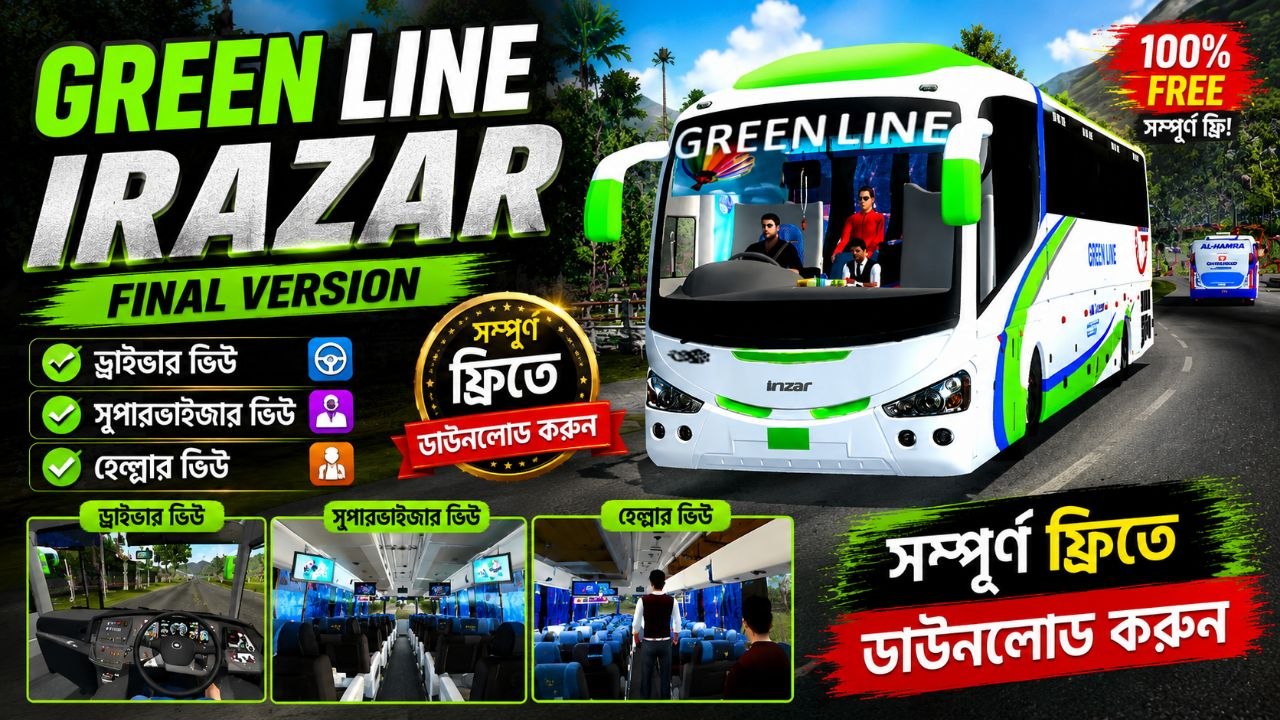
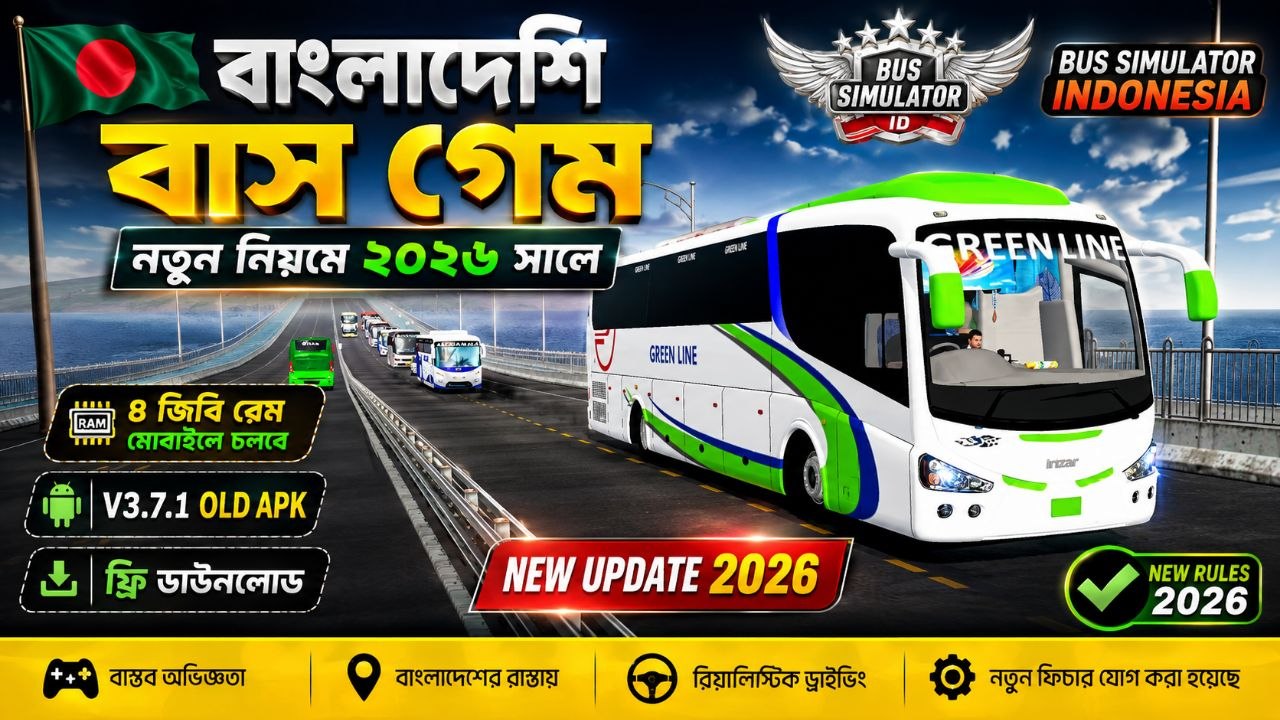
GREEN LINE IRAZAR V4 | Final Version | Driver View + Supervisor View + Helper View 🇧🇩🚌

Welcome to the GREEN LINE IRAZAR V4 Final Version, an exciting Bangladesh-inspired bus simulation experience created for players who love realistic bus driving, long-distance journeys, Bangladeshi roads, and immersive bus gameplay. This version brings together multiple gameplay perspectives, including Driver View, Supervisor View, and Helper View, giving players a more complete experience of operating and managing a bus journey. If you are a fan of Bangladesh Bus Simulator, Bangla Bus Games, Green Line-style bus gameplay, or realistic bus driving games, this V4 Final Version is designed to give you an enjoyable experience. From sitting behind the steering wheel as a driver to experiencing the journey from different viewpoints, this version focuses on making bus simulation more interesting and engaging. Whether you enjoy driving buses, exploring roads, managing passengers, or simply experiencing a Bangladesh-themed bus journey, GREEN LINE IRAZAR V4 provides an entertaining simulation experience. Download and experience the final version of GREEN LINE IRAZAR V4. 🇧🇩🚌 [AD_PLACEMENT] 🚌 GREEN LINE IRAZAR V4 Final Version The GREEN LINE IRAZAR V4 is presented as a final-version bus simulation project featuring an Irazar-style bus experience and multiple character perspectives. The main objective is to provide players with a more immersive bus journey where different roles can be experienced during gameplay. Unlike a simple bus driving game where the player only sits behind the steering wheel, this version introduces multiple views: Driver View Supervisor View Helper View Each perspective can make the gameplay feel different and allows players to experience the bus journey from another position. The Driver View focuses on the actual driving experience. The Supervisor View provides a different perspective of the journey and passenger environment, while the Helper View adds another role-based viewpoint to the overall simulation. This combination makes GREEN LINE IRAZAR V4 an interesting choice for players searching for a Bangladesh bus simulation game with a different style of gameplay. 🚍 Driver View The Driver View is one of the most important parts of GREEN LINE IRAZAR V4. In Driver View, players can experience the journey from the driver's perspective. The goal is to make the player feel more connected to the bus and the road while driving through different environments. Driver View is ideal for players who enjoy: Bus driving Steering and road control Long-distance journeys Bangladesh-inspired roads Bus simulation gameplay First-person driving experiences Realistic driving atmosphere Exploring routes Driving a large passenger bus requires attention to the road, traffic, turns, stops, and surrounding environment. This makes the driving experience more engaging than simply controlling a small vehicle. If you enjoy sitting in the driver's seat and experiencing a bus journey from inside the cockpit, the Driver View is one of the main features to try in GREEN LINE IRAZAR V4 Final Version. [AD_PLACEMENT] 👨‍💼 Supervisor View Another major feature of this version is the Supervisor View. The supervisor plays an important role in a bus journey. This viewpoint provides players with a different experience compared with traditional bus driving games. Instead of focusing only on the road ahead, the Supervisor View can provide a broader perspective of the bus environment and journey. Players who like role-based simulation can enjoy switching between the driver-oriented gameplay and the supervisor perspective. The Supervisor View adds variety to the gameplay and helps make the overall bus simulation experience more interesting. It can be especially enjoyable for players who want to experience the journey from a perspective other than the driver's seat. 👨‍🔧 Helper View The Helper View is another unique perspective included in GREEN LINE IRAZAR V4. The helper is an important part of the traditional passenger bus environment. Including a Helper View makes the simulation feel more complete and gives players another way to experience the bus journey. This feature is especially useful for players who enjoy: Role-playing simulation Bus crew experiences Passenger bus environments Different camera perspectives Immersive Bangladesh bus gameplay Exploring different positions inside a bus Having multiple views allows players to enjoy the same journey in different ways. Instead of completing the entire game from one fixed perspective, players can explore the experience through Driver, Supervisor, and Helper viewpoints. 🇧🇩 Bangladesh Bus Simulation Experience GREEN LINE IRAZAR V4 is designed around the style of Bangladesh bus simulation gameplay. Bangladesh has a unique bus culture, road environment, passenger transportation system, and long-distance travel experience. Bus games inspired by this environment can be particularly enjoyable for Bangladeshi players and anyone interested in South Asian transportation simulation. A Bangladesh bus simulator can provide an opportunity to experience: Busy roads Passenger buses Long routes Highway journeys Urban roads Rural environments Bus terminals Traffic situations Different road conditions Crew-based bus gameplay GREEN LINE IRAZAR V4 combines the bus-driving concept with multiple viewpoints to create an entertaining simulation experience. [AD_PLACEMENT] 🛣️ Explore Long Bus Journeys One of the most enjoyable aspects of a bus simulator is the journey itself. Unlike short arcade racing games, bus simulation focuses more on transportation and travel. Players can enjoy spending time on the road while controlling a large passenger bus. Long-distance bus journeys can create a completely different atmosphere. You can enjoy the road environment, manage your driving, and experience the journey from different perspectives. The Driver View makes the journey feel like you're actually operating the bus, while Supervisor and Helper Views provide alternative experiences. This makes GREEN LINE IRAZAR V4 V4 Final Version suitable for players who enjoy slower-paced simulation games as well as traditional driving gameplay. 🎮 Multiple Gameplay Views One of the biggest highlights of this version is the availability of multiple gameplay perspectives. Driver View Experience the journey from the driver's position and focus on controlling the bus. Supervisor View Experience the bus environment from a supervisor-oriented perspective. Helper View Experience another crew-based perspective from inside the bus. The three perspectives can provide more variety and replay value. Players can choose the viewpoint they enjoy most and explore the bus journey according to their preferred gameplay style. [AD_PLACEMENT] 🚌 Why Play GREEN LINE IRAZAR V4? There are many reasons why players searching for a Bangladesh bus game may want to try this version. 1. Multiple Views Driver, Supervisor, and Helper Views give players more flexibility. 2. Bangladesh-Inspired Gameplay The project focuses on the type of bus experience familiar to Bangladeshi players. 3. Bus Simulation Instead of being purely an arcade racing game, the focus is on passenger bus simulation. 4. Irazar Bus Experience The Irazar-style bus design and gameplay concept make the project interesting for bus simulation fans. 5. Final Version V4 is presented as the Final Version, making it a major version for players looking for the latest release of this project. 6. Immersive Experience Different viewpoints help create a more immersive environment. 7. Bangla Gaming Players interested in Bangladeshi and Bangla gaming content can enjoy another local-style simulation experience. 📱 PC & Gaming Experience Before downloading any game or modification, always check the requirements and compatibility information provided by the creator. Performance can vary depending on: CPU GPU RAM Storage Operating system Graphics settings Resolution Background applications For a smoother gaming experience, close unnecessary background applications and make sure you have enough free storage. If the game supports graphics settings, lowering resolution, shadows, textures, or other advanced options may help improve performance on lower-end systems. [AD_PLACEMENT] 🔥 GREEN LINE IRAZAR V4 Gameplay The gameplay experience is centered around the passenger bus and its crew environment. Start your journey as the driver, experience the road from the driver's seat, and explore the bus from other crew perspectives. The combination of multiple views gives players a reason to explore the same bus journey more than once. You can focus on driving, enjoy the interior environment, or switch perspectives to experience the journey differently. For bus simulator fans, these small details can make the gameplay much more enjoyable. 🇧🇩 For Bangladesh Bus Game Fans If you regularly search for terms such as: Bangladesh Bus Simulator Bangla Bus Game BD Bus Simulator Bangladesh Bus Driving Game Green Line Bus Game Irazar Bus Simulator Bangla Bus Simulator Bangladesh Simulation Game then GREEN LINE IRAZAR V4 may be an interesting project to explore. Bangladesh-themed bus games have a special appeal because they bring familiar transportation environments into the gaming world. Players can enjoy a simulation concept based around the buses, roads, and travel culture that they see in everyday life. 🏁 Final Version – V4 The V4 Final Version represents the latest version described in this release. The focus of this version is to provide a complete and enjoyable bus simulation experience with multiple perspectives. The three major views are: Driver View → Focus on driving. Supervisor View → Experience the journey from the supervisor perspective. Helper View → Experience the journey from the helper perspective. This makes the final version more than just a conventional bus driving game. [AD_PLACEMENT] 💻 How to Enjoy the Game After installing the game according to the creator's instructions, start by exploring the Driver View. Take some time to become familiar with the controls and road environment. Once you are comfortable with driving, try the Supervisor View and Helper View. Experimenting with different views can help you discover more details of the bus and its environment. For the best experience: Use headphones if available. Play at a comfortable resolution. Adjust graphics according to your PC. Keep enough storage available. Close unnecessary background programs. Learn the controls before starting a long journey. Explore each available camera/view. Follow the game's instructions. 🚍 Realistic Bus Simulation Fans Bus simulation games are popular among players who enjoy transportation, driving, and realistic vehicle experiences. Unlike racing games, bus simulators are generally focused on transportation rather than maximum speed. Players may enjoy: Driving carefully Following routes Exploring roads Managing a passenger bus Experiencing different environments Operating a large vehicle Enjoying long journeys Exploring different camera views GREEN LINE IRAZAR V4 follows this general simulation concept while adding multiple crew perspectives. [AD_PLACEMENT] 🎯 Who Should Try GREEN LINE IRAZAR V4? This game/project can be interesting for: Bangladesh bus game fans Bus simulator players Irazar bus fans Green Line-style bus enthusiasts Bangla gaming viewers Driving simulator players Transportation simulation fans PC gaming enthusiasts Players who enjoy role-based simulation Players looking for Bangladesh-inspired games If you enjoy watching or playing Bangladeshi bus simulation content on YouTube, Facebook, TikTok, or other platforms, this type of gameplay may be worth exploring. 🌟 GREEN LINE IRAZAR V4 Features Here is a quick overview of the main highlights: ✅ V4 Final Version ✅ Driver View ✅ Supervisor View ✅ Helper View ✅ Bangladesh-inspired bus simulation ✅ Irazar-style bus experience [AD_PLACEMENT] ✅ Passenger bus gameplay ✅ Multiple perspectives ✅ Long-distance journey experience ✅ Immersive bus environment ✅ Bangla gaming experience ✅ Bus simulation-focused gameplay [AD_PLACEMENT] 📢 Download Information If you are looking for GREEN LINE IRAZAR V4 Final Version, make sure you use a legitimate download source provided by the game's creator or publisher. Always check the download page for the latest version, installation instructions, system requirements, and any required additional files. Avoid suspicious websites, modified installers, or unknown executable files. Keep your antivirus and operating system security features enabled when downloading PC games. If a download is labeled 100% Free, verify that the source actually provides the game without requiring unauthorized payments, suspicious software, or unrelated installations. [AD_PLACEMENT] 🚌 GREEN LINE IRAZAR V4 – Final Thoughts GREEN LINE IRAZAR V4 Final Version brings together the elements that bus simulation fans enjoy: a passenger bus environment, Bangladesh-inspired gameplay, long-distance journeys, and multiple perspectives. The addition of Driver View, Supervisor View, and Helper View gives the game a different style compared with a standard bus simulator. For players who enjoy Bangladesh bus games, Bangla gaming, Irazar bus simulation, and realistic transportation experiences, V4 provides an interesting way to experience a virtual bus journey. Whether you want to drive the bus, experience the supervisor perspective, or explore the helper role, there are multiple ways to enjoy the gameplay. If you are searching for a Bangladesh Bus Simulator, Green Line Irazar V4, Irazar Bus Game, Bangla Bus Game, or Bus Driving Game, this Final Version is worth checking out. Enjoy the journey, drive safely, and have fun! 🇧🇩🚌 [AD_PLACEMENT]

×